
Instructions for Accessing the NEW Online Payment Portal
3/6/2026
Instructions for Accessing the NEW Online Payment Portal
Step 1:Go to https://kenansville.org/
Step 2: Click on the Payment Options icon on the home screen page.
Step 3: On the Payment Options page, you need to click the GREEN button, Pay Your Bill Now
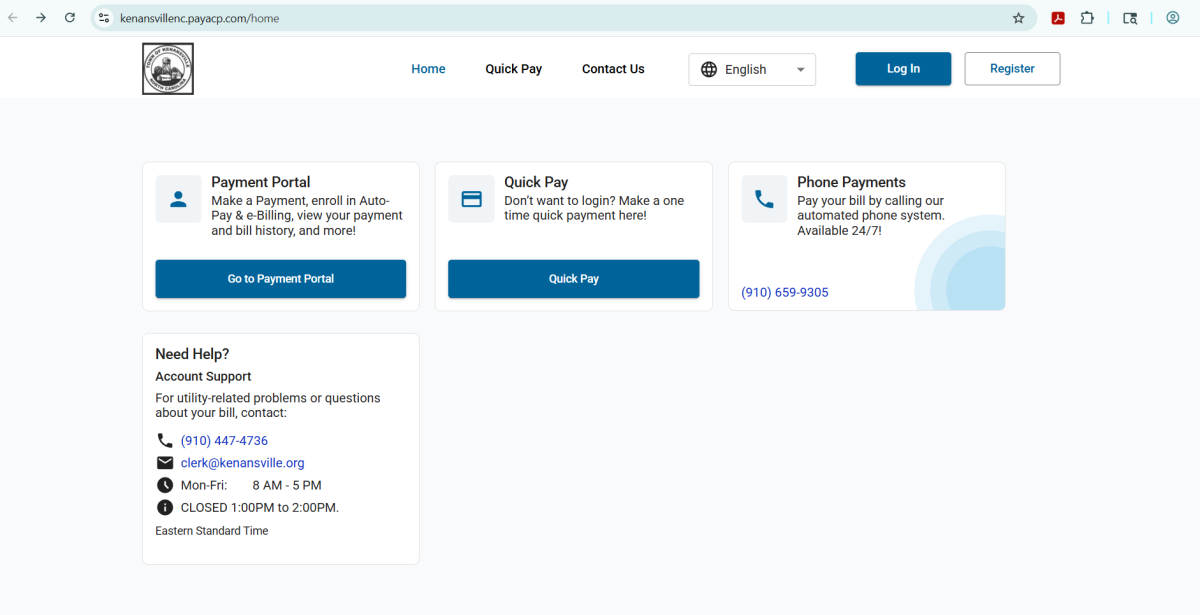
Step 4: Once you click it, a new tab will open that takes you to the NEW Payment Portal Home Page.
Step 5: On the Home Page, you'll need to select either Quick Pay or Payment Portal.
Step 5A: If you select the Quick Pay option, this is for individuals who want to make one-time payments. It will NOT save your payment information on your account.
Step 5B: If you select the Payment Portal option, this will allow you to set up a reoccurring payment method. If you'd like to have your account automatically drafted on a date that YOU choose, you'll need to create an account to set this up.
For either option selected, you'll need a WEB-ID, which can be found listed on your monthly utility bill from the Town of Kenansville. You will also need the area zip code, which is 28349.
If you have any questions or need assistance, please contact the Kenansville Town Clerk via email at clerk@kenansville.org or by phone at (910) 447-4736.